Thursday, December 11, 2014

Symfony site localization based on domain name

Problem: I want to localize my site based on the domain name.

Symfony strongly suggests that you use paths (like '/en' or '/fr') after the domain name to determine what the locale should be. This is ideal for a site with only one domain name, but for a site that has a different one for each localization, it's unnecessary. You should be able to determine the language based on the domain.

Solution: Use an event listener.

With an event listener, you can catch the request, parse the domain name, and set the locale appropriately. For this blog's purposes, let's say that a site has www.endomain.com for its English site and www.frdomain for its French site.

Create this folder/file in your bundle: EventListener/LocaleListener.php. Inside, put this:

namespace My\CustomBundle\EventListener;
use Symfony\Component\EventDispatcher\EventSubscriberInterface;
use Symfony\Component\HttpFoundation\Session\Session;
use Symfony\Component\Security\Http\Event\InteractiveLoginEvent;
use Symfony\Component\HttpKernel\Event\GetResponseEvent;
use Symfony\Component\HttpKernel\HttpKernelInterface;


class LocaleListener
{
  public function setLocale(GetResponseEvent $event)
  {
    if (strstr(strtolower($_SERVER['HTTP_HOST']), strtolower('frdomain')))
    {
      $request = $event->getRequest();
      $request->setLocale('fr');
    }

  }
}

If the HTTP_HOST contains the string 'frdomain', then set the locale to 'fr'.

Now register the listener in your bundle's services.yml file (it should be in Resources/config/). Inside, put this:

services:
    my_custom.language.kernel_request_listener:
        class: My\CustomBundle\EventListener\LocaleListener
        tags:
            - { name: kernel.event_listener, event: kernel.request, method: setLocale }

Now every time a request is sent to Symfony, this listener runs first and sets the locale to 'fr' if it detects 'frdomain' in HTTP_HOST. Otherwise, it keeps the default locale (in this case, it's en).

That should work! Happy coding!

Monday, January 13, 2014

Symfony, internalization/localization, and 404 pages

Background

Given 1) the Symfony framework and 2) the need for localization, one shouldn't be surprised that there's a package that takes care of that already (somewhat): JMSI18nRoutingBundle. It works so that in your config.yml, you can specify the default locale, the locales that your site works with, and what the domain names are for each locale. I guess I'm not using this bundle correctly, though, because although my config.yml file looks like this:

jms_i18n_routing:
  default_locale: %locale%
  locales: [en, fr]
  strategy: custom
  hosts:
    en: www.englishVersion.com
    fr: www.frenchVersion.com
  redirect_to_host: true

typing in the French locale into the address bar redirects to the English site. (And if you happen to have an inkling of what I'm doing wrong, do let me know!)

This necessitates the extra steps of 1) creating a separate /fr path that serves up French content and 2) configuring .htaccess to redirect www.frenchVersion.com to that path.

The Problem

Given that 1) www.frenchVersion.com originally serves up English content and 2) needs coaxing in .htaccess to redirect, I hit the problem of English 404 pages appearing under the French domain. Ie., www.frenchVersion.com/path-does-not-exist will serve up the English 404 message.

The Solutions

The halfway solution - detect the language in the template

In my custom 404 page (in project_root\app\Resources\TwigBundle\views\Exception\error404.html.twig), I included an if-statement that checked the domain name and then set the variable lang appropriately.

{% set lang = ('frenchVersion' in app.request.getHost()) ? 'fr' : 'en' %}

{{ 'projname.error404.copy' | trans({}, "messages", lang) }}

This solution only worked halfway, though. While the 404 message was in French, the surrounding layout.html.twig was still in English.

Full solution - create a listener for any exceptions thrown

With the guidance of this Stackoverflow answer, I was able to check for the domain name before anything was rendered when an exception is thrown. This is a two-file (or two-part) solution. First, you create a LanguageListener in projectroot\src\GenericName\SpecificNameBundle\EventListener. Code it like:


namespace GenericName\SpecificNameBundle\EventListener;
use Symfony\Component\HttpFoundation\Session\Session;
use Symfony\Component\Security\Http\Event\InteractiveLoginEvent;
use Symfony\Component\HttpKernel\Event\GetResponseEvent;
use Symfony\Component\HttpKernel\HttpKernelInterface;


class LanguageListener
{
  public function setLocale(GetResponseEvent $event)
  {
    if (strstr($_SERVER['HTTP_HOST'], 'frenchVersion'))
    {
      $request = $event->getRequest();
      $request->setLocale('fr');
    }
  }
}

And then in projectroot\src\GenericName\SpecificNameBundle\Resources\config\services.yml:

services:
  # ...
  genericname.language.kernel_request_listener:
    class: GenericName\SpecificNameBundle\EventListener\LanguageListener
    tags:
      - { name: kernel.event_listener, event: kernel.exception, method: setLocale }

And there you go! Even your layout should be rendered using the correct locale. Go try it out! Happy coding!

Friday, November 8, 2013

Using Symfony's routing.yml file for different host names

I like extensions, but when they crap out on you, you're kind of a sitting duck. So rather than rely on them, I figured I might as well learn to handle multiple domain names the extension-free way. Did you know this is now available in Symfony? How to match a route based on the host.
I needed a language toggle for my website, so that when a user is on the English site, the link to the French is available, and vice versa. Between routing.yml, parameters.yml, and config.yml, I was able to create a decent (but still "wordy") toggle for the pages I needed. (And as I type this, I realize that the correct way might be annotations instead. I'll look into that in a bit.)
Step 1: parameters.yml (in app/config/)
This is the only file that will contain the domain names in English and French. Ergo, all other config files will pull from this file. Specify keys like “domain_locale_en” and “domain_locale_fr” to hold the domain names of your English and French sites.
domain_locale_en:    www.programmingnotestoself.com
domain_locale_fr:    www.notesdeprogrammationalauto.com 
Step 2: config.yml (in app/config/)
This is the file where you’ll make the domain names available to the Twig (template) files. Modify the twig section.
twig:
    # ...
        globals:  
            domain_en:    %domain_locale_en%
            domain_fr:    %domain_locale_fr%
If you ever need to print out the domain in a link, for example, you can just do this:
< a href="%domain_en%">English blog< /a>
(If you try to include "http://" in parameters.yml, you’re going to get a surprise. At least, I did… I ended up in the default Symfony welcome page.)
Step 3: routing.yml (in app/config/)
This is the part that I’m sure can use a little more polishing, so if you have suggestions, please let me know. But, anyway, given that I now have two domain names for the root, I can code routing.yml like this:
en_root:
  path:     /
  host:     %domain_locale_en%
  defaults: { _controller: BlogPostsBundle:Default:index }

fr_root:
  path:     /
  host:     %domain_locale_fr%
  defaults: { _controller: BlogPostsBundle:Default:index }
So, yes, whether it detects www.programmingnotestoself.com or www.notesdeprogrammationalauto.com, it’ll go to the same controller. Ugly, no?
The not-so-fun part
Because of this hack, all the other pages and routes in my site need to be registered twice in the routing file. For example, www.programmingnotestoself.com/help and www.notesdeprogrammationalauto.com/aide lead to the same page, but Symfony needs to know that. This is how they look like in my routing.yml file:
_help:
    pattern:   /help
    host:      %domain_locale_en%
    defaults:  { _controller: BlogPostsBundle:Default:help }

_aide:
    pattern:   /aide
    host:      %domain_locale_fr%
    defaults:  { _controller: BlogPostsBundle:Default:help }
Notice host:? This restricts the path to that particular domain name. So www.programmingnotestoself.com/aide is totally legit, but try www.programmingnotestoself.com/aide and it’ll fail. But if you take out host:, you can totally do a crossover (the latter link). As for what locale will be served up, it’ll be whatever the domain name’s locale is.
The cute part
I didn’t know you could force Twig to translate a string to a particular locale!
Assume that the controller for this page passed on variable $lang as either 'fr' or 'en' and $lang_name as 'English' or 'Français':
{% if lang == 'en' %}
    < a href="http://{{domain_fr}}/{{ 'help'|trans(locale='fr')}}>{{lang_name}}< /a>
{% else %}
    < a href="http://{{domain_en}}/{{ 'help'|trans(locale='en')}}>{{lang_name}}< /a>
{% endif %}
If you’re on the English site, force 'help' to be translated to the French string, and do similar if you’re on the French site.
Happy coding!

Thursday, October 3, 2013

My new best friend

error_reporting(E_ALL);
ini_set('display_errors', '1');
Like most programmers, I do var_dumps and echo's... But when all else fails--this.

Tuesday, September 17, 2013

Symfony 2 symblog tutorial errors

It seems that the Symfony 2 tutorial ("Symblog") is a little out of date. While going through it, I stumbled on some unexpected behaviour. There were exceptions getting thrown when the tutorial made no mention of them. This could be due to several behaviours being deprecated since 2.1; I was using 2.3.4.

So without further ado...

The errors and their fixes as you work through the tutorial

1) When creating a controller method for the Contact page, $form->bind($this->bindRequest($request) resulted in:

FatalErrorException: Error: Call to undefined method Symfony\Component\Form\Form::bindRequest() in /path/to/root/src/Blogger/BlogBundle/Controller/PageController.php line 31

I poked around at code that I already knew worked and found this alternative:
$form->bind($this->getRequest());

2) While editing src/Blogger/BlogBundle/Entity/EnquiryType.php, adding this line $metadata->addPropertyConstraint('body', new MaxLength(50)); in static function loadValidatorMetadata(ClassMetadata $metadata) resulted in an exception:

FatalErrorException: Error: Class 'Symfony\Component\Validator\Constraints\MaxLength' not found in /path/to/root/src/Blogger/BlogBundle/Entity/Enquiry.php line xx

I read elsewhere that MaxLength and MinLength are deprecated since Symfony 2.1, so you're better off declaring the above line as
$metadata->addPropertyConstraint('subject', new Length(array('max' => 50)));

Just make sure to add this to the top of the class: use Symfony\Component\Validator\Constraints\Length;

3)When told to add the following lines to src/Blogger/BlogBundle/Resources/config/config.yml

parameters: blogger_blog.comments.latest_comment_limit: 10
You will instead get an error along the lines of blogger_blog.comments.latest_comment_limit must be defined. Now, the solution is to either do this tutorial (http://symfony.com/doc/current/cookbook/bundles/extension.html), or do the shortcut, which I did (because lazy).

4) While trying to enable Assetic for BloggerBlogBundle, you are instructed to put it in app/config/config.yml. However, it doesn't take effect. Instead all sidebar.css-ing disappeared. This is because you should have put BloggerBlogBundle in app/config/config_dev.yml.

5) Yui Compressor jar file not found - Make sure that 1) you've put the jar file in app/Resources/java and that 2) the name of that jar file is the same as in config_dev.yml.

If there will be more, I will update this post. Happy coding!

Saturday, July 20, 2013

Symfony 1.4 error: Class 'BaseFormDoctrine' not found in (projectpath)/BaseAuthorForm.class.php

Blogging because I thought this error was funny!

Currently, I'm playing around with Symfony 1.4 (for particular reasons). I've gotten to the part where I can now generate modules so that CRUD forms will be auto-created for me. When I executed this command:

php symfony doctrine:generate-module --with-show --non-verbose-templates frontend author Author

I got this error:


PHP Fatal error:  Class 'BaseFormDoctrine' not found in (pathto project)/lib/plugins/sfDoctrinePlugin/test/functional/fixtures/lib/form/doctrine/base/BaseAuthorForm.class.php on line 14.


I searched around because I'm completely new to Symfony and am under a deadline. (Spending the weekend on this. Sigh...) Heard that there's a file called config_autoload.yml.php in cache/frontend/dev/config that maps out what file the key "BaseFormDoctrine" leads to. As it turned out, it led to lib/plugins/sfDoctrinePlugin/data/generator/sfDoctrineForm/default/template/sfDoctrineFormBaseTemplate.php.

So I looked at it. And guess what! The opening php tag in the file didn't begin with "<?php". It began with "[?php".

Changed that square bracket to "<" and I was back on the road.

Monday, June 17, 2013

Ruby on Rails (on Windows) - "ruby_check_sizeof_voidp is negative"

Today I installed Ruby on Rails on my Windows machine, but had to jump through a few hoops to get it done. The biggest stumbling block was that whenever I got down to executing "rails new myapp", I got a long error that started with

C:/Ruby193/bin/ruby.exe extconf.rb
creating Makefile

make
generating generator-i386-mingw32.def
compiling generator.c
In file included from c:/Ruby193/include/ruby-1.9.1/ruby.h:32:0,
                 from ../fbuffer/fbuffer.h:5,
                 from generator.c:1:
c:/Ruby193/include/ruby-1.9.1/ruby/ruby.h:109:14: error: size of array 'ruby_check_sizeof_voidp' is negative
In file included from c:/Ruby193/include/ruby-1.9.1/ruby.h:32:0,
                 from ../fbuffer/fbuffer.h:5,
                 from generator.c:1:


and ended with

make: *** [generator.o] Error 1

and some version of the message "make sure the json gem was installed correctly" and "log errors will be stored at C:\Ruby193\lib\ruby\gems\1.9.1\gems\json-1.8.0\ext\json\ext\generator\gem_make.out".

So I tried "gem install json -v '1.8.0'" (sometimes with "--platform=ruby") but I still received errors. Then I actually looked at gem_make.out and sow the following line: "c:/Ruby193/include/ruby-1.9.1/ruby/ruby.h:109:14: error: size of array 'ruby_check_sizeof_voidp' is negative".

Cue this StackOverflow post, and I realized that I did not install the correct Devkit. I so wanted to work with the latest release of everything that I ignored the "Which Development Kit?" section of this Ruby Installer for Windows page.

I reinstalled Devkit (following the instructions here) and actually created my new web app. Now, I have Ruby 1.9.3 working with Rails 3.2.13 and the tdm-32-4.5.2 version of DevKit installed.

Thursday, May 30, 2013

So... what are you supposed to do, really?

You know what would be really nice?

If a website promoting some product that purports to make my programming life easier would state what problem it solves. I don't mind searching for more information on a product and looking up word combinations I've never seen before, but, really, something like this would be nice: "Hey, remember when you tried to scale your app and you spent, like, a week wrangling everything into place? This product will let you do that in less time!"

/end_rant

Sunday, April 28, 2013

jQuery UI (1.9.2) dialog box did not have an image for its close button

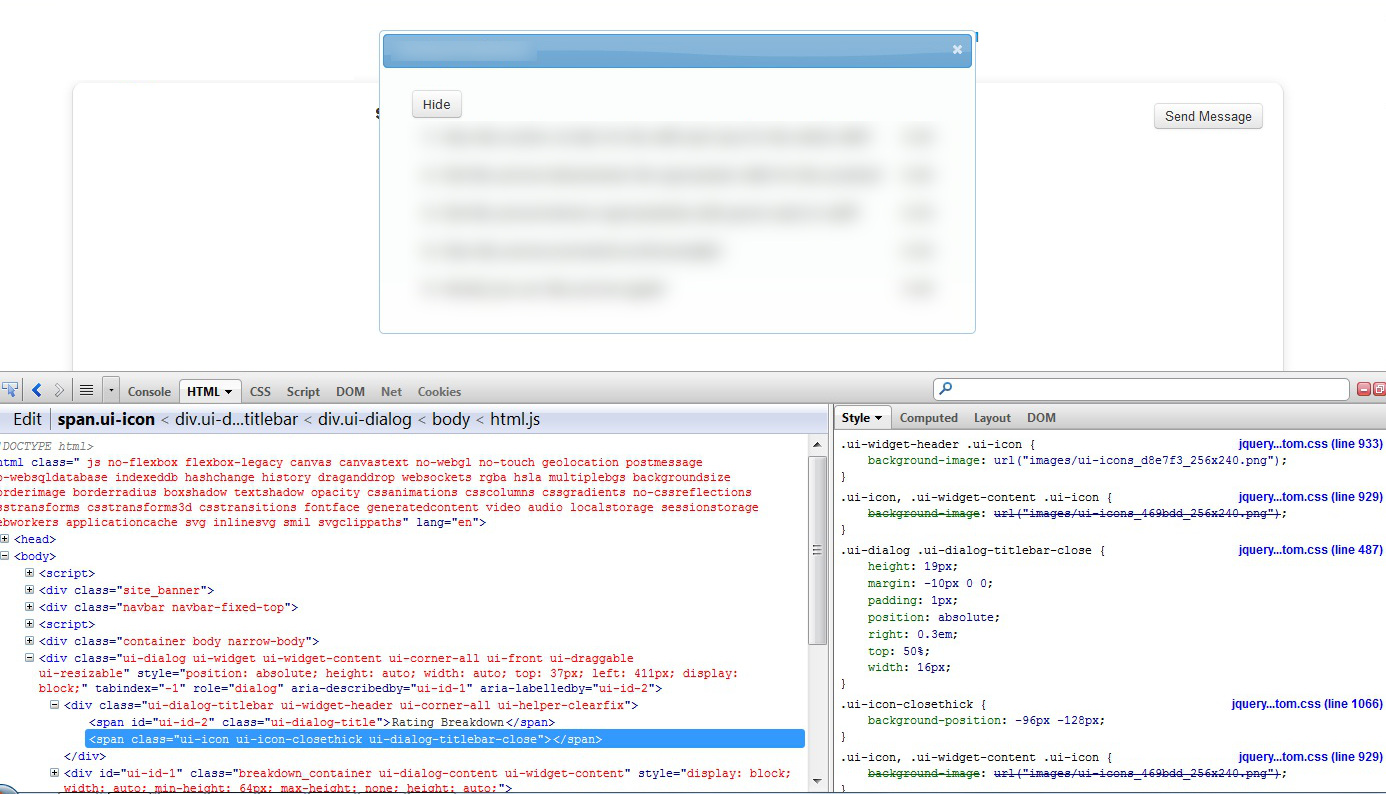
The title is pretty self-explanatory, but let me demonstrate. This was the dialog box that caused me a few hours of pain on Thursday and Friday:


Notice the "Hide" button? It's because I was so frustrated with the close button that I originally planned to make the contents of the dialog appear on the webpage itself, with an option for the user to hide on show the contents (with tacky buttons, imo).

Anyway,  I thought at first that maybe I did not have the image file for this jQuery-UI theme. I did. Perhaps they were not being loaded properly. They were. Then I remembered that a few months ago, I was working on another website with a working dialog box, so I took a look at and the code behind it.


The button was a span element! So I took a look at the old, working jQuery-UI file and the 1.9.2 version and guess what I found out: the new one uses the button element.


(I searched for "ui-dialog-titlebar-close" in the JS file to see where the button would be created and assigned that class.)

How to fix? Good ol' copy and paste.


By replacing the button element with the span element, I finally got an image for my dialog box close button, except it wasn't quite correct.


If you've downloaded and unzipped a jQuery-UI theme, you'll know that the all the icons for jQuery-UI stuffs (like calendar arrows and dropdown triangles) are just in one file.

In the above photo, notice how you can see the edges of the icons next to the "x" in the png file. This was an exciting find for me (!!) because I always wondered why the icons weren't stored as images by themselves.

So on Friday I learned that jQuery-UI selects its icons from one PNG file through margin, width, and height attributes. (Go try it out on Firebug!) I adjusted these attributes and ended up with a properly centred "x" icon.


A better look at the fixed up CSS:


I'm not actually sure if there was an easier way to fix my close button image problem. I'm sure changing to an older version of jQuery-UI would've been the correct approach, but, to be honest, a lot of things have been breaking left, right, and center depending on what version of jQuery I've loaded, and I didn't want to take the risk with this one.

Hope this helps somebody out there. Happy coding!

Saturday, April 6, 2013

Passing a PHP array to a Javascript Ajax call

Recently, I found myself making an Ajax call to a PHP function and needing more than just one piece of data back from it.

For those who don't know, a PHP function can "return" data to an Ajax call by echoing the data out. So, for example, given this Ajax call:

  $.ajax({
      type: "POST",
      url: 'http://www.domainname.com/module/controller/insert',
      data: { name: 'Donna Oberes', address: 'The Universe' }
    }).done(function(msg) {});

And given a function that inserts data into the database, returning/echoing data would look like:

  public function insert($name, $address)
  {
    $new_id = 
      $this->people_model->insert(array('name' => $name, 'address' => $address));
    
    // Return the ID by echoing
    echo $new_id;
  }

The calling Ajax function will 'catch' $new_id with the variable msg and do whatever it wants with it.

But how about if I need more than just the new_id? Say, for example, I need the new id and a nicely formatted date of when this new id was created. I have to return these through an array, but the key is to return the array json_encoded. So I should do this:

 
  public function insert($name, $address)
  {
    $new_id = 
    $this->people_model->insert(array('name' => $name, 'address' => $address));
    $data = array('id' => $id, 'date' => 'April 6, 2013'); 
    echo json_encode($data).
  }

And then in the ajax call that catches the printout, msg will catch the array, but the array has to go through $.parseJSON so that it's usable as a JavaScript array.

  $.ajax({
      type: "POST",
      url: 'http://domainname.com/module/controller/insert',
      data: { name: 'Donna Oberes', address: 'The Universe' }
    }).done(function(msg) {
      var obj = $.parseJSON(msg);
      // Print out
      $('#student_list').append("New student ID " + obj.id + " added on " + obj.date);
    });

Thursday, March 21, 2013

CodeIgniter-Bonfire and Images

Here is simple code for displaying images in an MVC framework like CodeIgniter-Bonfire. This entry assumes that one already has an understanding of how such a framework works.

The Database Table

Ideally, your database table would contain the following columns with the following types: id (int(11)), title (varchar(255)), mimetype (varchar(255)), filesize (int(11)), content (longblob).

The id, title, and filesize columns are self-explanatory. The mimetype is information you need later on for rendering the photo and can be obtained as you're uploading the photo. (The filesize is also something you can get when you're uploading the photo.) The content is the image itself in a binary format.

The View

At the very least, the view will have a form with one input element of type file so that you can upload the photo. Once you submit the form, you can validate the file size and the extension.

Sample form:

< form action="http://some.website.com/images/create" enctype="multipart/form-data"> < /form>

< input id="file" name="file" type="file" />

< input name="save" type="submit" value="Upload" />


The enctype must be 'multipart/form-data.' Otherwise, the $_FILES variable will not be created when you submit the form. $_FILES will contain all the file information you need. If the input box is named 'file', you can get the uploaded file's size through $_FILES['file']['size'].

Sample controller:
class images extends Front_Controller
{
  public function create()
  {
    if ($_FILES['file']['size'] > 0)
    {
      // Get the file info
      $name = $_FILES['file']['name'];
      $size = $_FILES['file']['size'];
      $type = $_FILES['file']['type'];
      $tmpname = $_FILES['file']['tmp_name'];
      
      // Grab the contents of the photo
      $fp = fopen($tmpname, 'r');
      $content = fread($fp, filesize($tmpname));
      fclose($fp);

      // Load your model, if your constructor doesn't 
      //do it for you
      $this->load->model('images/Images_model', 
      'images_model');

      $data['title']        = $name;
      $data['mimetype']     = $type;
      $data['filesize']     = $size;
      $data['content']      = $content;

      // Save the image
      $insert_id = $this->images_model->insert($data);

      // Now go print out a success message if $insert_id 
      // is an integer,or an error message if it's false
    }
  }
}

Displaying the image 
 
When you want to display the image, the img tag's src should point to another function in your images controller. This function retrieves the images' content from the databases and prints it out with the appropriate headers.

Sample view

Here is a photo: 
< img src="http://some.website.com/images/fetch/8" alt='a picture' />

The controller function will look like the following (put this below the create() function):
public function fetch($id)
{
  $this->load->model('images/Images_model', 
  'images_model');
  $image = $this->images_model->find($id);
  ob_clean();
  header("Content-type: ".$image->mimetype);
  echo $photo->content;
}

And that's it! The image will be echoed out to the browser as an actual image (as opposed to the garbage it looks like in the database) because of the Content-type. Your browser knows how to interpret the following data.

Tuesday, January 29, 2013

Codeigniter Bonfire error: "Cannot redeclare function in a view file"

Well, that was annoying.

Background

I'm working with Codeigniter-Bonfire to create a web application. CI-Bonfire is an MVC framework that lets you put views within views by calling modules::run('path/to/controller/function', $arg).

Error

I kept getting this error whenever I tried to call modules::run on a function that I know works.

Fatal error: Cannot redeclare function_name() (previously declared in /path/to/view_file.php:2) in /path/to/view_file.php on line 15.

Line 2  in view_file.php is where I declare the function. Line 15 is where the function ends. I know this error comes up because I'm using view_file.php twice somehow and that's why the function is getting redeclared. But where??

Back to the controller I go and I noticed that I forgot a simple else statement.

In CI-Bonfire, you can print out a view either by itself (using the standard base_url/module/controller/function/args path) or by calling $this->load->view('view_folder/view_file', $args_array) in the controller if you've set some variable to true.

My rendering function looked like this:

if ($hmvc)
$this->load->view('view_folder/view_file', $args_array);
Template::render();

But it should've looked like this:

if ($hmvc)
$this->load->view('view_folder/view_file', $args_array);
else
Template::render();

Phew!

Tuesday, November 20, 2012

Using jQuery .on() rather than .onClick on dynamically generated buttons

Last week, I was beating my head over why the .click() event wasn't working with a dynamically generated button. My setup was that the buttons were given the class 'do_this' and the javascript looked like:

$('.do_this').click(function(){ /* insert code here */ }; 

At first I thought maybe it was because the code wasn't inside $(document).ready(), so I put it inside one. Didn't work. Then I tried assigning the attribute and value 'onClick="runThisFunction()"' to the button instead. Still no go. (I also thought maybe I should define the Javascript functions after the buttons were generated, so I did just that. I'm not sure why it didn't work, though. It could be because the JS that rendered the buttons happened through a .post call.)

Then my co-worker pointed me to the jQuery .on() method. Surprise, surprise: it worked! The code looks like this now:

$(document).on("click", '.add_contact', function(event) { /* insert code here */ });

The jQuery documentation goes on to explain why .on() works and none of my previous attempts did:
Delegated events have the advantage that they can process events from descendant elements that are added to the document at a later time. By picking an element that is guaranteed to be present at the time the delegated event handler is attached, you can use delegated events to avoid the need to frequently attach and remove event handlers. This element could be the container element of a view in a Model-View-Controller design, for example, or document if the event handler wants to monitor all bubbling events in the document. The document element is available in the head of the document before loading any other HTML, so it is safe to attach events there without waiting for the document to be ready.
See? I put everything inside document so the class was already rendered when the Javascript bound the class to the click event.

So with that in mind, happy coding!

Saturday, October 13, 2012

Bringing up a jQuery dialogue before going to a controller

Currently, I'm using CodeIgniter/Bonfire for a website that does your basic CRUD operations. One of the functionalities the user wanted was a confirmation dialogue that the user really wanted to delete an item, which corresponds to an entry in the database. My problem was that, while I knew how to bring up jquery dialogue boxes, I wasn't sure how to redirect the dialogue to the controller that would actually delete that item from the database. My solution was to use the "id" attribute of my delete button.

While iterating through the items returned from the table, print out the name of the item and a delete button beside it. The delete button is really an anchor tag styled to look like a button.

< a class='btn delete' id='".site_url()."modulename/controllername/function_name/{$item->id}'>Delete< /a>

Notice that I didn't use the href attribute. What I would've put in href, I instead put in id. If I hadn't, I wouldn't be able to call the jquery dialogue because the page would instead go to the href link.

Whenever this anchor tag is clicked, this piece of javascript would be run:

$('a.delete').click(function() {
    var dest = $(this).attr('id');
    $('#confirm_delete').css("display", "block").dialog({
          height: 150,
          width: 350,
              modal: true,
              buttons:
              {
            Yes: function(){
              window.location = dest;
            },
            No: function(){
              $(this).dialog('close');
      }}}).dialog('open');});


It's basic jquery, but the key is the assignment of the anchor tag's id attribute. The above code says: when an anchor tag with class 'delete' is clicked, grab that anchor tag's ID attribute and store it in variable "dest". Then look for an html element with the id "confirm_delete" and display it in a dialogue with the following height, width, and buttons: Yes and No.

Just so you know, the div with id = confirm_delete is somewhere on the page with this code:

< div id="confirm_delete" style="display: none;" 
title="Remove item">
Are you sure you want to remove this item?
</ div>

If the user clicks on the "Yes" button, then the user will be redirected to the controller that will actually delete the item. If he chooses "No", then the dialogue just closes. 

Monday, July 9, 2012

Uploading a custom header image to the twentyeleven theme in Wordpress

This is more of a note to myself.

Right now, I am tasked with customizing the twentyeleven theme into another theme , and it involves turning off the rotating header images. After unsuccessfully doing a walkthrough of the associated code (that begins in header.php with a call to header_image()), I found the functions.php file under wp-content/themes/. In the twentyeleven_setup() function, I found a call to register_default_headers, which takes in an associative array. I only need one header image, so I deleted all but one key-value pair, renamed the key to something that made sense, and pointed the 'url' key to the photo filename. Now, although I haven't deleted any of the other header images from the directory structure, the code will only pick up the one header image I registered.

Wednesday, March 28, 2012

Self-note: error concerning NetFx40_IIS_schema_update.xml

So a while ago, while trying to restart IIS, I got an annoying error that said C:\Windows\System32\inetsrv\config\schema\NetFx40_IIS_schema_update.xml wasn't a well-formed xml file. Fine. I checked it, and it was indeed malformed--it contained only nulls.

Fix this by deleting the goshdarn file.

Tuesday, October 18, 2011

Getting Thunderbird to work with distribution.ini

The bug I'm working on is the ability to customize vanilla Thunderbird with a group of settings (through distribution.ini). For those who do not know, Thunderbird is Mozilla's open source mail client. (Mozilla = makers of Firefox). I'm far from done. This entry is a culmination of what I have learned so far.

Checkout the repo

I am working with Fedora, so I use yum. I followed the build and configure instructions from here. In a nutshell, here are the steps to cloning the comm-central
(Thunderbird) repo:

1) yum install mercurial - to get Mercurial, a version control tool.

2) Create a file called ".hgrc" in your home directory and put these in it:


[ui]
username=Firstname Lastname
merge=internal:merge

[diff]
git=1
showfunc=1
unified=8

[defaults]
commit=-v

Note: Obviously, replace Firstname, Lastname, and my.email... with your information.

3) Make sure you're in the directory that you want to put the repo in (for example, your home dir) then checkout the repo:
hg clone
http://hg.mozilla.org/comm-central/ src-thunderbird

So now you should have a "src-thunderbird" folder in your current directory.

Building Thunderbird

1) Go to your src-thunderbird directory (cd src-thunderbird).

2) Create a .mozconfig file. (I use vi, so vi .mozconfig). This file will contain your build configurations for Thunderbird. The contents of mine are:

mk_add_options MOZ_OBJDIR=@TOPSRCDIR@/obj-tbdebug

ac_add_options --enable-application=mail

ac_add_options --enable-debug

ac_add_options --disable-optimize

"obj-tbdebug" is the directory where all my object files will end up (you can change what you call yours). I will refer to this as objdir, from now on. The second line says, build me Thunderbird. The third line is because I need debugging printouts. The fourth line I just threw in for good measure. You can read more about configuration options here.

3) Build Thunderbird! "make -f client.mk build" (while still in src-thunderbird). This step will take a while (more than a half hour in my case).

4) Once the build is done, run Thunderbird with ./objdir/mozilla/dist/bin/thunderbird. Since we configured this build with the debug option, you will see a lot of printouts at your terminal.

Updating the repository

Make sure you're in the src-thunderbird directory. On the terminal, execute python client.py checkout. Re-build again.


Modifying the source files

The source files are everything outside your src-thunderbird file. Everything in it are your object files. When you modify your source files, you need to re-create your object files. You can run make -f client.mk build again (in your src-thunderbird dir), and it won't take as long as the first time.

If you changed files in only one directory, you can re-make only that directory. For example, if you changed files only in ~/src-thunderbird/mail/components, run make -C objdir/mail/components.

Getting distribution.ini working

1) This is a sample distribution.ini. This file must be placed in objdir/mozilla/dist/bin/distribution.

2) Add "distribution.js \" to the EXTRA_JS_MODULES section of Makefile.in (which resides in ~/src-thunderbird/mail/base/modules).

3) distribution.js should be in ~/src-thunderbird/mail/base/modules. I copied and modified the Firefox version. (Code referring to bookmarks and livemarks were ripped out.) I also changed the name of the object it exported to something like TBDistCustomizer.

(Note: JS modules have EXPORTED_SYMBOLS at the start of the file. This is as opposed to components files (which are also JS), which do not.)

4)
cd to objdir/mail/base/modules and type "make".

5) Modify mailGlue.js (in ~/src-thunderbird/mail/components) so that:

(a) It would import distribution.js (Components.utils.import("resource:///modules/distribution.js");); and

(b) it would create an instance of TBDistCustomizer. This intance can now be used to call the code in distribution.js that actually changes prefs (applyPrefDefaults).

Hitting the brick wall

So now I've come to the point where preferences set in distribution.ini are being set in Thunderbird, but there is a catch: some prefs are set properly, while others are duplicated. For example, mail.phishing.detection.enabled is set correctly, but something like network.cookie.lifetimePolicy instead becomes duplicated, with one version having the default and the other having the value that was set in distribution.ini.

I am still trying to figure out why this is so...


Climbing the brick wall

The problem was that distribution.ini doesn't like spaces around the "=" sign. network.cookie.lifetimePolicy = 1 should be network.cookie.lifetimePolicy=1.

Thanks to...

The MailDev team at Mozilla! In particular Standard8 and sid0 for helping me get started.

Wednesday, June 15, 2011

Mozilla XPCom

Here is the link to a list of ALL the XPCOM contract ID's/components and interfaces are: http://www.oxymoronical.com/experiments/xpcomref/

I am currently working on creating an addon that will always take settings from Internet Explorer and set the same prefs for Firefox. Still in the research stages, tho.

Tuesday, May 24, 2011

SHUTDOWN ABORT

I feel powerful executing the above command as a sysadmin 3=) While practicing on my own database for DBA625, I happened to close a session after thinking that zenit has once again frozen. As it turns out, closing session doesn't necessarily end all processes in my database. When I tried logging on again, I got this:


SQL> connect sys as sysdba
Enter password:
Connected to an idle instance.
SQL> startup
ORA-01012: not logged on
SQL> startup mount;
ORA-01012: not logged on

After some googling and deciding that I do not want to mess with resetting memory sizes, I came across "SHUTDOWN ABORT;" and it fixed all my problems.


SQL> SHUTDOWN ABORT
ORACLE instance shut down.
SQL> STARTUP
ORACLE instance started.

Total System Global Area 631914496 bytes
Fixed Size 1338364 bytes
Variable Size 440402948 bytes
Database Buffers 184549376 bytes
Redo Buffers 5623808 bytes
Database mounted.
Database opened.

Thursday, April 7, 2011

Lessons in creating Firefox Enterprise

Firefox Enterprise

For the past 6 months, I have been at CDOT as Mike Hoye's cronie, and along with scott and annasob, I have been working towards creating an enterprise version of Mozilla's Firefox. Bespoke IO, mhoye's company, will be selling the software that lets administrators customize Firefox and produces the MSI that makes deployment across a network easier. It will also be offering Sync services. If you are not familiar with that, Sync lets you store your browsing history in a server--your own or Mozilla's--so that you can you can access your browsing history, passwords, and bookmarks across several different devices. I will leave the elevator pitch for the boss.

As far as I know, an enterprise version of Firefox conflicts with Mozilla's philosophies about freedom on the web. (To illustrate what "freedom on the web" means, an example: if a user wants to watch a video on YouTube, s/he should just be able to click on a link and the video will play instead of being told that s/he needs a plugin.) That is why Mozilla has not produced the product themselves, and an opportunity for my co-op position was available.

Since Mozilla is open source, it was a matter of taking the existing Build Your Own Browser code and customizing it (with a lot of guidance from kev and lorchard!). The first screenshot is what our BYOB was near the beginning of the project. The first thing I added was the Homepage tab. The second screenshot is what the latest version looks like. The administrator can now choose to lock some things, like the homepage, proxy settings, and which updates are allowed.


Wading through code

It was a mess :s As mhoye put it, he threw me under a bus. Although the framework BYOB was built on was documented (Kohana), for me, there was no way to actually understand what was happening in BYOB unless I did a million printouts and walkthroughs. I realized only much later that the code was exactly what they taught Seneca students in the SYS courses. You have your views, controllers, and models, and then the database.

mhoye had me started on letting an admin choose what the homepage was. Where do I begin? My coding bff since then has been the Multi-file Search option in Textwrangler. I searched for all instances of General, then Locales, then Collections in the hopes that I could trace what happened whenever these words popped up. The problem was that General was useless and Locales was coded differently from little prefs like homepage and proxy settings.

Luckily, kev and lorchard were kind enough to point me in the right direction. But then, it was like giving me a clue as opposed to telling me exactly what to do, which was better in the end. Teach a man how to fish and all that.

Since then, I have gotten to know BYOB really well, but I still learn something everyday, whether it's coding in PHP or bits of Firefox itself. (I dabble in Python every other month, too, but I avoid that part of the code as much as possible.) So far, I can lock down the homepage, proxy settings, and updates. End users cannot change them. Administrators can also add certificates and specify what server they want to use with Sync (if they want it to be used at all).

Challenges

Mozilla's goal is to give the user the best web experience possible; mine is to cramp the user's style just a little bit.

The last great roadblock I had was both a coding problem and a Firefox issue: how do I get BYOB to upload certificates and then add them to the list of certificates in Firefox right from the beginning?

The frustrating thing about coding with Kohana was that I didn't grasp the idea of routes right away. There is a special file in the framework that says, if your url is like this: http://myapp.com/fnName/randomText/moreRandom/, then you should be accessing the first file with function fnName in it (there could be more than one!), and pass it the "*[Rr]andom*" arguments.

I also came up with what I believe to be a rather inelegant solution to adding certificates to Firefox... only to find out that unless I find a way to make the certificate window read-only/disappear, a user can delete any certificate in it. That's problem # 2.

Problem # 1 is bookmarks. Adding bookmarks to a Firefox build was something that Moz's BYOB already did, but how do I lock those bookmarks so that users can't delete them? I know of places.sqlite, bookmarks.html,and the bookmarkbackups folder... But how do I fiddle with those three so that my bookmarks can't be deleted? Right now, I can create a file with json-formatted bookmarks data in it and name it so that Firefox will always load those bookmarks when the browser starts. But that prevents any bookmarks the user will add from loading. Not very user-friendly.

Problem # 3 is preventing the user from deleting addons. Right now, addons are locked so that a user can disable them, but not delete them. From the reading I've done, there is a file called userChrome.css that I can write myself; it prevents the addon manager from appearing at all. I could insert that file into the depths of the Firefox application directory. Is there a better way?

What's next?

Sometime in the summer semester, I believe mhoye is looking for beta testers, so a deadline is tentatively set. My goal for the next week is to leave some good documentation (so that I don't curse myself when I come back from the semester break) and get the bookmarks locked. Still not sure what to do... If you have any answers, please share :D